How Thunder Pigeon works
Your child opens the app, answers ten questions and closes it again. The app keeps track of everything in a topic and asks about each thing again just before your child would forget it. This is called spaced repetition.
A topic is a list of things to learn
A topic might be Cells, or Electricity and circuits. Each one is broken down into single things to learn: a fact, a key word or how to do something.
These are the things they need to know before they can do much with a topic. With those learned, an exam question is about how to use what they know, and they aren't also trying to remember what a word means or which formula it is.
The app has several ways of asking about each thing, so your child has to know it and can't get by on recognising the question.
Topics come from what the teacher gave your child, from the library of ready-made topics, or from the starter topics. How parents add topics.
Controls the cell and holds its DNA
Particles spreading from a high to a low concentration
Lowest-power lens first, coarse focus, then fine focus
A quick study is ten questions
It takes about five minutes. One question is on the screen at a time, with “4 of 10” above it.
What's in the ten
The ten start with things your child is due to go over again, then some new ones. One is something they've found hard, and one is something they already know but haven't seen for a while.
After each answer
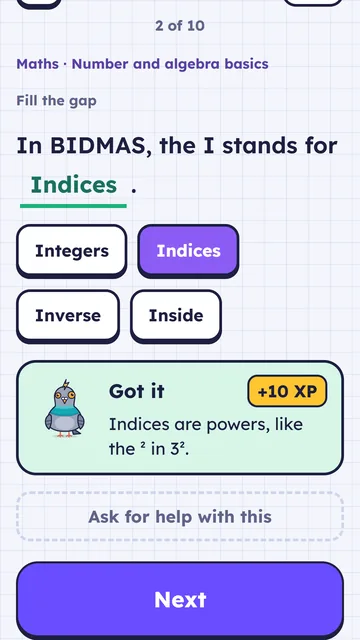
Your child sees the right answer and a line about why it's right. If they get a question wrong, they get it once more at the end, marked “One you missed”.
The questions get harder as they learn
Something new starts as multiple choice. Once they're getting it right, they pick the missing word from a few choices, and after that they type it themselves.
The kinds of question
- Multiple choice
- A few answers to pick from, in a different order each time.
- Fill the gap
- A sentence with a word missing.
- Number answer
- For maths and for the sums in science.
- Put in order
- The steps of a method, shuffled.
- Flashcard
- Say it in your head, turn it over, then “Got it” or “Not yet”.
- Exam question
- These are only in the boss round. They answer, then tick the marks they got against the mark scheme.
When your child gets each thing again
Each time they get something right, it's left longer before they get it again. If they get it wrong, the gaps start again from the beginning.
Once they've got something right three times in a row, it counts as learned, and the app says “You know this”. They'll still get it now and then so they don't forget it. Spaced repetition, explained for parents.
The home screen says what to do next
It's called the Flight plan: a short list, in order, with one button at the top.
Your child doesn't have to keep a timetable or choose what to do. If they have a test coming, the test is first on the list. If they don't, it's a quick study.
Once they've done one quick study, that's today done. After that the button offers another one, and says today's streak is safe.
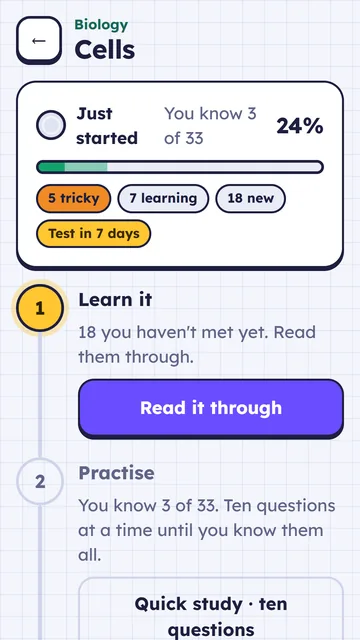
The steps in a topic
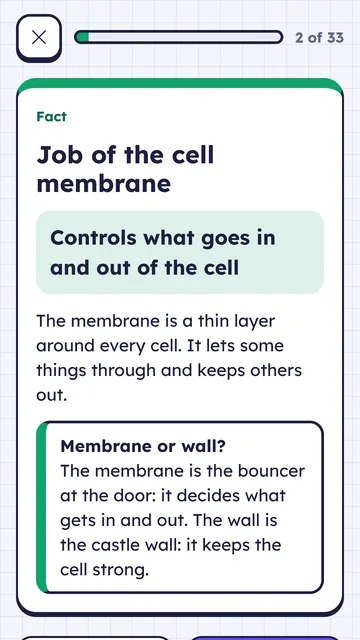
- Learn it They read through the topic one thing at a time, with a memory hook where there is one.
- Practise They do quick studies, ten questions at a time, until they know everything in the topic.
- Boss round Three exam-style questions, for topics that have them. It opens once they know half the topic, or two weeks before a test on it.
- Keep it They keep getting questions from the topic in their quick studies, less and less often.
Show what you know. If they've already done some of a topic at school, a quick check lets them skip the things they get right. Anything they get wrong in the check doesn't count against them.
When a test is coming
You add the test, or your child does from the app: what it's called, the date and the topics it covers.
The two weeks before
The test is first on the Flight plan, and quick studies are on just its topics. The test has its own page with a plan for each day: what to read first, how many quick studies to do, and the boss round the day before.
On the day
They get twenty quick-fire questions as a warm-up. If they get one wrong they have up to two more goes at it, and if it's still wrong it's left for another day. Cram has flashcards and a quick-fire quiz for a last look before they go in.
Test week is the pigeon's favourite. It charges up, and on the day the home screen wishes them good luck.
The pigeon
Each child gets their own. They pick its colour and name it. Kevin, Brenda and Nigel are among the suggestions.
Levels
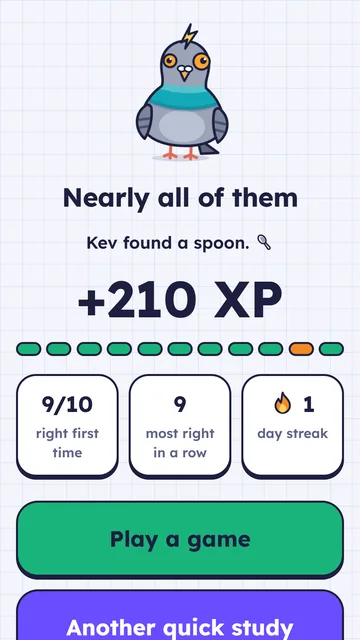
Right answers earn XP, and three or six right in a row earn more. The first levels come quickly. The pigeon changes at level 5 and again at level 10.
Finds
It brings something back from every quick study: a chip, a bolt, a bus ticket. Some are rare, and some only turn up at one time of year. Bigger things take longer, such as a traffic cone for seven days in a row. Every find is worth crumbs, which your child spends on things for the pigeon to wear.
Streaks and freezes
One quick study a day keeps the streak going. Every seven days in a row earns a freeze, which covers a missed day. They can hold two.
Games
Six out of ten right by the end of a quick study or quick-fire quiz earns a short game, counting a second go at one they missed. There are eight, from Dash and Stack to Crack the code.
What isn't in the app
- No leaderboards, between friends or between your own children.
- No chat, and no way to share anything with anyone.
- No adverts, and no payments in the app.
- No clock counting down on a question.
It works without a connection and sends the answers later. Sounds and vibration can each be switched off, and there's a dark theme. Safety and your child's data.
Try it with one topic
Free for 14 days, with no card. Sign up, add your child and their topics, and link their phone.